Installment (qist) and leasing businesses in Pakistan run on trust, but they survive on records. Selling a motorbike, mobile phone, fridge or furniture on installments means tracking every customer’s plan for months, sometimes years. When records are kept in registers, it becomes hard to answer simple questions: who is due this month, who is late, and how much is still outstanding in the market?
This guide explains how to keep clean installment records, from the day a customer registers to the last payment.

Why installment records go wrong
- Customer details and guarantor information are incomplete or hard to find
- The agreed plan (advance, number of installments, monthly amount) is written in one place and payments in another
- Nobody knows exactly which customers are due this month until they are already late
- Payments received are not matched against the plan, so balances drift
- Records are lost or damaged because there is no backup
1. Register every customer properly
Before selling on installments, record the customer’s full details, including their ID card information, the stamp paper used for the agreement, and the details of their guarantors. If a customer stops paying, these records are what you rely on, so collect them every time, not only for new customers.

2. Put the full installment plan on the bill
The invoice should show the complete plan: total amount, advance received, number of installments and the monthly amount. When the plan is part of the bill, there is no confusion later about what was agreed, and the customer gets a clear printed copy.


3. Keep a ledger for every customer
Each customer should have a ledger showing what they bought, what they have paid, and what is still due. A detailed ledger (item by item) helps when a customer disputes a payment; a consolidated ledger gives a quick total of what they owe.

4. Work from a monthly recovery sheet
The most useful report in an installment business is the recovery sheet: a list of customers whose installments fall due, based on the due date of each monthly installment. Use it at the start of every month to plan collection visits and calls, and follow up on anyone who missed the previous month.

5. Record every payment the day it is received
When cash is collected, enter it against the customer straight away. Payments left in a pocket diary until the weekend are the most common reason ledgers do not match.
6. Keep stock and profit in the same system
Installment businesses also buy stock from suppliers. Recording purchases, supplier payments and sales in the same system means stock updates automatically and you can see your real profit by date.
7. Back up your data
Your customer and recovery records are the business. Take regular backups and keep a copy outside the computer.
SoftBiller Installment Business Software
SoftBiller’s Installment Business Software is made for small and medium installment and leasing businesses. Based on its product features, it includes:
- Customer registration with ID card, stamp paper and guarantors
- Billing with a complete installment plan
- Customer recovery report based on the due date of each monthly installment
- Cash recovery from customers and payments to suppliers
- Customer and supplier ledgers (item-wise detail and consolidated)
- Products with purchase and sale rates, and automatic stock management
- Date-wise profit report
- Invoices with A5 and thermal print options
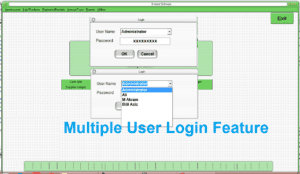
- Multi-user login, password change and user privileges
- Backup and restore
- Runs on all versions of Windows, with a lifetime licence and no monthly or annual fee
Getting started
- Enter your products with purchase and sale rates.
- Register your existing installment customers with their guarantor details.
- Enter each running plan and the amount already paid.
- From now on, bill every new sale with its installment plan.
- At the start of each month, print the recovery sheet and follow it.
Want to see how it works? Visit the Installment Software page for screenshots and the overview video, or message us on WhatsApp at 0333-7454059.